Real-time seismic monitor, interactive 3D map, and current data
Monitoring seismic activity in the Ring of Fire and worldwide. View current data from USGS, EMSC, and GFZ on an interactive 3D map | Today's Earthquakes | Latest Global Seismic Activity
EQCitizen 3D is an advanced seismic monitoring platform designed to provide a comprehensive and accurate view of Earth's seismic activity. Through an interactive 3D map , we connect citizens with the world's most important official scientific data streams, transforming complex numbers into an intuitive, web-based visual experience that is completely free and requires no installation.
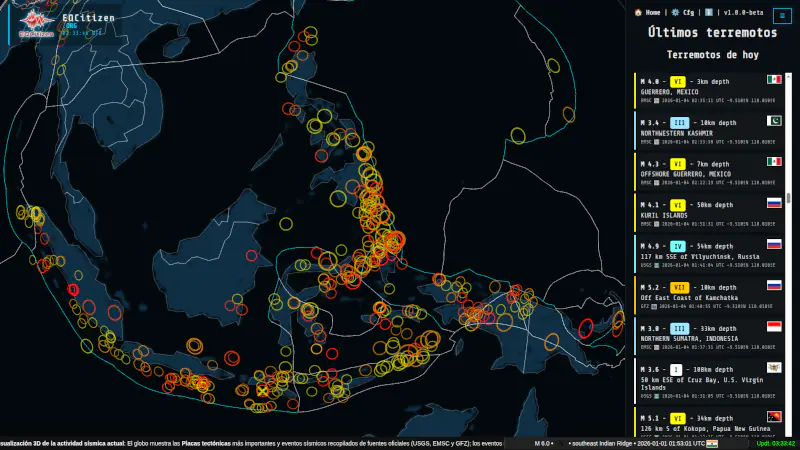
What does our Interactive 3D Earthquake Detection Map do?
Our system processes and displays the latest earthquakes detected worldwide in real time . Special attention is given to the Ring of Fire , the area of greatest seismic and volcanic activity on the planet, allowing users to monitor events from their origin to their final magnitude.
🛰️ Open the 3D Seismic Monitor in full window and start viewing today's earthquakes
Main Features
-
Current and Official Data : Direct integration with the most prestigious seismological sources: USGS (USA), EMSC (Europe) and GFZ (Germany) updated every 30 seconds.
-
3D Globe : Interactive spherical visualization that allows you to rotate, zoom and analyze the depth of the epicenters.
-
Smart Filters : Customize your view by magnitude, depth, or data source to focus on what really matters.
-
Performance Optimization : Map complexity selector (Light/Detailed) to match the power of your device, optimizing CPU and memory usage.
-
Multilingual Access : Available in 9 languages to facilitate access to critical information globally.
-
CINEMA MODE : After a period of user inactivity, the system takes over the application. It continuously monitors the latest event and areas typically most affected by earthquakes, such as the Pacific Ring of Fire . If you have configured your geodetic coordinates, the app will also fly over that area. The data is saved in your browser. We do not receive any of it. You can view it by pressing F12 in your browser, going to the Application tab, and you will see it in Local storage. If you want to delete the data, simply delete that file. Again, we do not receive any of it. The tool was created primarily to safeguard user privacy, focusing all efforts on providing a truly useful and free tool.
-
Extended mode: Without event listing, allowing exclusive use of the full-screen interactive map
-
Approximate data consumption:
-
Initial full load. Only the first time if the site has not been visited before: HTML + necessary images + rendering engine + maps + glitches + country lines: 1.8 MB
-
Remaining times the application is opened once cached: 162Kb.
-
Every 30 seconds (loading data from official institutions): According to the average of several tests performed, between 140Kb and 331Kb (depending on whether there is new data to update. If it is the same file, the system does not download it again, it uses the one from the cache).
-
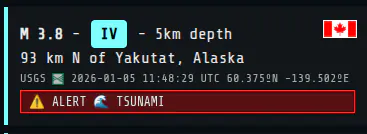
DATA SHOWN FOR EACH EVENT:
-
We have a wide variety of data provided by official sources:
-
Date and UTC time of the event
-
Magnitude on the Richter Scale ML
-
Magnitude on the Mercalli MMI scale, with colors to differentiate events
-
Earthquake depth
-
Geodetic coordinates of the epicenter.
-
Description of the place
-
Indicative flag of the country
-
Name and small image of the institution that detected the event (the data source).
-
Tsunami alert notice in case the agency has indicated it.
-
Notices on the marquee for potentially large events
-
-
3D Map : The globe lets you go anywhere in the world and check the latest events. It's very easy to use.
-
By clicking we move the globe as we please
-
We use the mouse wheel to zoom in/out, to get closer or further away.
-
The circles indicate an event that occurred at those coordinates.
-
The size of the circle indicates its magnitude based on the Richter scale
-
The color indicates the 'age' of the event:
-
Red: It has less than 24 hours
-
Reddish-orange: Between 24h and 48h
-
Orange: Between 48 hours and 4 days
-
Yellow: More than 4 days
-
-
-
The map shows the lines of the most important faults, differentiated by color.
-
The last earthquake is marked on the map with a flashing X to make it easier to locate (the CINEMA mode will point it out, as it always shows the last event).
-
The marquee displays important information about the tool and its use, as well as recent and potential events that have entered the system within the last hour and warrant our attention. Even if there are simultaneous potential events, we will see them all in the marquee alternately. When you hover the mouse over the marquee, it will pause so you can read the content you're interested in. When you move the mouse away from it, it will resume normal scrolling.
-
The bottom right margin has been reserved to show the most significant earthquakes of the last 7 days or so.
-
The list shows the last 300 earthquakes, ordered by date (most recent to least recent), so we can quickly and easily identify today's earthquakes.
-
Clicking on an event will take you directly to the epicenter of that earthquake using the globe. After one minute of inactivity, the system will automatically return to Cinema mode.
-
If there is a tsunami warning, it appears clearly next to the event. Currently, the USGS is the only agency that provides this information alongside tsunami events.
-
The earthquake times and the one shown in the upper left margin are in UTC format, which is the standard for seismology, except for the lower right margin, which shows the local date of the last data update.
-
The system is intelligent and detects repeated events from different sources, displaying only one with the most reliable source (even so, there is a configuration to be able to see them all without joining them, so that each source remains separate).
-
Since it works directly with a browser, there's absolutely no need to install anything. If you want to use it in full-screen mode as an earthquake monitor, pressing the F11 key will normally open it in full screen (press F11 again to return to normal mode).
-
Since this is monitoring software where you spend many hours in front of the screen, it's important that the monitor doesn't emit too much light, which could strain your eyes. A dark mode has been chosen, with dark colors for the platform that are still easily readable, without sacrificing readability or the visibility of events.
-
PRIVACY-ASSURED SETTINGS
-
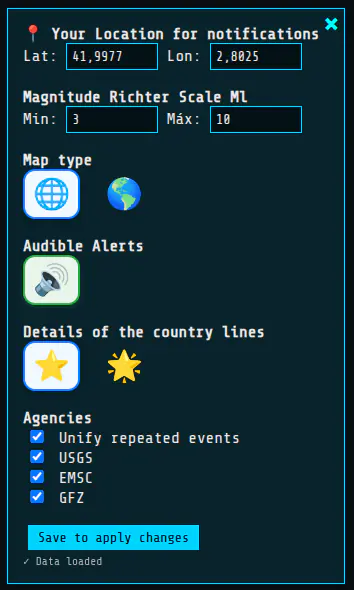
Custom settings: The map allows you to save a minimum of options, creating an immersive experience tailored to your individual needs and preferences. It's important to know that we respect your privacy. Any data you save in these settings is saved directly to your browser. We receive absolutely nothing. If you reset your data or clear your browsing history, you may need to reconfigure your settings. Keeping your privacy safe is very important to us. IT IS IMPORTANT TO SAVE FOR THE SYSTEM TO APPLY THE CHANGES .
-
Geodetic coordinates of your position:
-
The system alerts you if a significant or large earthquake reaches the system's detection zone near your area. If it is a large or very close earthquake, it will provide you with the arrival times of each seismic wave.
-
In CINEMA mode, the system constantly flies over certain points of interest based on seismic information. It shows us the current seismic activity in those areas. The geodetic coordinates entered also serve as a mandatory point of visit for this CINEMA mode scene, so the system will periodically fly over that area as well.
-
-
Minimum and maximum magnitude filter:
-
It serves to further filter the data, showing only the range of magnitudes that interest us.
-
-
Map type:
-
Flat color world map: Clearer, easier to draw, and more efficient for the system. Uses neutral colors to facilitate earthquake visualization. Recommended for continuous monitoring.
-
Satellite world map: More realistic. It consumes slightly more resources due to the use of a non-flat, color-coded image, but in return for a more realistic view of our planet.
-
-
Audible alerts:
-
We can activate or deactivate it. If activated, the system will notify us when a significant event occurs or when a major earthquake happens that requires monitoring. IT DOES NOT REPLACE OR BE USED AS AN EARLY WARNING SYSTEM. ALWAYS CONSULT OFFICIAL SOURCES.
-
-
Details of the dividing lines of the countries:
-
Simple: Very easy to draw for a system with limited resources and sufficient to differentiate each country. On the other hand, some lines may be missing, such as on small islands.
-
Detailed: More difficult to draw for the system but suitable for recent computers. It helps to differentiate much more accurately and better represents the separations and boundaries of countries at the cost of using more resources.
-
-
Agencies / Institutions:
-
Unify events: If this option is selected, the system will use only one agency (the one the system deems most authoritative) to represent that event, excluding the others. The event, along with the chosen agency and its details, will only appear once in the list. This prevents duplicate events from appearing in the same list.
-
Separate events: Otherwise, if this option is unchecked, the system will treat each event as a completely separate event, even if multiple agencies detect the same event. This is useful for comparing data across different agencies, but it can result in dozens of repeated events in the same list.
-
Agencies: You can select or deselect the agencies you want to appear in the list. At least one must be selected.
-
-
Versions and Evolution of the Project
We are committed to transparency and continuous improvement. Here you can find updates to our 3D engine as we implement them:
| Version | Date | Key Improvements |
| v1.0.0-Beta | 5 January 2026 |
|
| v1.0.2-Beta | 6 January 2026 |
|
A Project Based on Efficiency
At EQCitizen 3D , every millisecond counts. We've designed our engine to process seismic data with the lowest possible latency. We record processing and data generation times to ensure you receive epicenter information as quickly as possible after its official detection. Testing has been performed on 12-year-old PCs without detecting any performance issues, guaranteeing proper functioning on most platforms and hardware, without requiring a powerful PC. We will soon be implementing new features to further enhance the user experience.
It's mobile-friendly, so you can use it on your phone without any problems, barely consuming any CPU or data. The data exchanged between the server and the browser is minimal, and it only downloads what's actually needed, as it's filtered before downloading. The application is web-based, and like any website, when you visit it, the browser downloads the necessary files the first time. Once downloaded, it consumes almost no resources. Even if you reload it another day, most of the files will be in the cache, so they won't be downloaded again. New features will be added soon to further improve resource efficiency.
Minimum scale limitation to M3.0
There is a logical minimum scale limit for the application and the received data. We have set it at magnitude M3.0. This is because official sources don't provide every earthquake we want, whenever we want it, as we would be overloading their servers with information we probably won't even use. Earthquakes happen every day, and most are of low magnitude. The project would be unfeasible, both for them and for us, with such a massive amount of data. The logical limit of M3.0 ensures we can filter out much of the unnecessary information before we receive thousands of data points, allowing us to work more efficiently with the useful information. EQCitizen 3D also allows you to raise or lower this limit to easily filter the results.
The challenge of large events: Data centralization in times of crisis
When a large-magnitude earthquake occurs, the amount of information generated can be overwhelming and often fragmented. During the first few minutes of a crisis, seismological agencies work under extreme pressure to process preliminary data, which often results in:
-
Discrepancies in initial magnitude between different organisms.
-
Delays in updating the depth and exact epicenter.
-
Saturation of individual servers due to high query traffic.
EQCitizen 3D solves this problem by acting as a centralized node. Our tool simultaneously monitors the three most important official sources ( USGS, EMSC, and GFZ ). Instead of requiring the user to consult multiple websites, our system automatically collects, filters, and updates the data in real time. This allows for immediate comparison and a much more accurate view of the event's evolution, facilitating analysis and monitoring.
Legal Notice and Scientific Responsibility
The goal of EQCitizen is to facilitate the visualization of global seismic activity for informational and educational purposes. For proper use of this platform, the user should keep the following in mind:
-
Data Source : This platform does not generate its own data. The information displayed comes entirely from publicly accessible external services provided by the United States Geological Survey (USGS) , the European-Mediterranean Seismological Centre (EMSC) , and the German Research Centre for Geosciences (GFZ) .
-
Preliminary Information : Recent earthquake data is often automated and preliminary . It may be subject to significant modifications or corrections (in magnitude or location) once it is manually reviewed by seismologists from the agencies mentioned.
-
Use for Safety : This tool should not be used as the sole source for making critical safety or evacuation decisions. In the event of an emergency, we urge you to always follow the instructions of civil protection authorities and local emergency services.
-
Service Availability : Although we work to maintain constant updates and use 3 different sources, we are not responsible for technical interruptions originating from the data sources or errors in the transmission of real-time information.
Why rely on monitoring from 3 sources?
By cross-referencing data from these three institutions, EQCitizen reduces the margin of error and offers vital informational redundancy:
| Fountain | Region of greatest precision | Data Type |
| USGS | Global and America | Scientists / High precision |
| EMSC | Europe and the Mediterranean | Rapid citizen detection |
| GFZ | Global and Asia/Pacific | High sensitivity seismological network |
ACKNOWLEDGMENTS AND ATTRIBUTIONS
- The logos and trademarks shown belong to their respective owners.
- 3D rendering engine: https://threejs.org/.
- Data extracted from and owned by official sources:USGS, EMSC, GFZ
- Mercalli scale color range shown on Wikipedia.
- Google alarm sound.
- Tectonic plates.
- Detailed country coordinates.
- Simple country coordinates.
- US country coordinates.
- Satellite Earth. Specular & Texture.
- Monocolor Earth.
Marquee information
The following information is exactly what appears on the EQCitizen 3D marquee. It is very useful information and can be of great help.
- EQCitizen.org is a city-wide seismic detection community. The data includes citizen contributions and local sensor data, so it may be affected by noise and everyday activity.
- 3D Visualization of Current Seismic Activity: The globe shows the most important Tectonic Plates and seismic events compiled from official sources (USGS, EMSC and GFZ); recent or ongoing events may be reviewed or corrected by those agencies.
- The 3D application is interactive and features a 'CINEMA' mode, which activates automatically after one minute of inactivity. The system will travel around the planet, displaying the epicenters of recent earthquakes, and will tour the areas hardest hit by the Ring of Fire
- The list contains Recent Earthquakes, including today's earthquakes. The number of recent earthquakes depends on the number of events that have occurred, up to a maximum of 300.
- The colors in the list are shown according to the Mercalli Intensity Scale (MMI)
- This platform provides guidance; always consult official sources before making security decisions.
- External sources may not always be available due to maintenance, network issues, or publishing delays. In the event of temporary unavailability, some recent events may not appear or their values may be updated later.
- The system attempts to obtain current data every 30 seconds. This official data usually takes a few minutes to confirm events. Some recent events may not appear until confirmed by these agencies.
- Map circles: The size indicates the magnitude according to the Richter scale (local magnitude scale ML). Colors => Red: occurred less than 24 hours ago; Red-orange: occurred 24-48 hours ago; Orange: occurred between 48 hours and 4 days ago; Yellow: occurred more than 4 days ago.
- Citizen community: Some of the information may come from local users and sensors; it does not replace official data.
- Data in progress: Magnitudes, locations, and depths of recent events may be updated or corrected by the agencies.
- Do not use this system to make emergency decisions: For evacuations or critical actions, follow local authorities and official announcements.
- Intellectual property: The logos and trademarks shown belong to their respective owners.
- Time traceability: All times are shown in UTC unless otherwise indicated; check the time of the last update.
- Error reporting: If you detect clearly erroneous data, report it for review.
- Reproduction permitted with mandatory attribution: You may use or reproduce the content of eqcitizen.org provided you clearly mention the source: https://eqcitizen.org.
- It is not permitted to alter, hide or superimpose elements that prevent the identification of the origin (for example, covering texts, images or logos with other logos or brands).
- Use is free directly from the website Eqcitizen.org, except for appropriation, modification that removes attribution, or presentation as one's own. See full terms at eqcitizen.org.
- Repeated seismic events may occur. There is a margin of error between different epicenters, updates, date and time of the event, and data from different sources.
- Data is updated every 30 seconds. Flags and country assignments are estimates based on coordinates and may not match the actual country or may be inaccurate.
- This software, the 3D Map of Recent Earthquakes, is currently in Beta development and may contain programming errors, calculation mistakes, or other issues that could result in inaccurate information or system crashes.
- The CINEMA mode will take you on tours of all the areas usually affected by earthquakes, such as the Pacific Ring of Fire.